
This solution uses Retrieval-Augmented Generation (RAG) to combine enterprise content with Snowflake Cortex so answers are grounded in trusted internal knowledge. Instead of relying only on the model’s general training, the chatbot retrieves relevant document chunks first and then generates a response using that context.
Companies usually store knowledge across PDFs, SOPs, FAQs, wikis, and support documents. Searching these sources manually is slow, and generic chatbots often return incorrect or outdated answers because they lack company context. The goal was to create a secure internal assistant that improves answer quality without adding external retrieval infrastructure.
The solution needed to achieve the following: Provide accurate, context-grounded answers. Stay entirely within Snowflake for governance and security. Scale seamlessly as enterprise content grows. Support controlled access so users only see information they are authorized to view. Keep the implementation simple enough to automate and maintain.
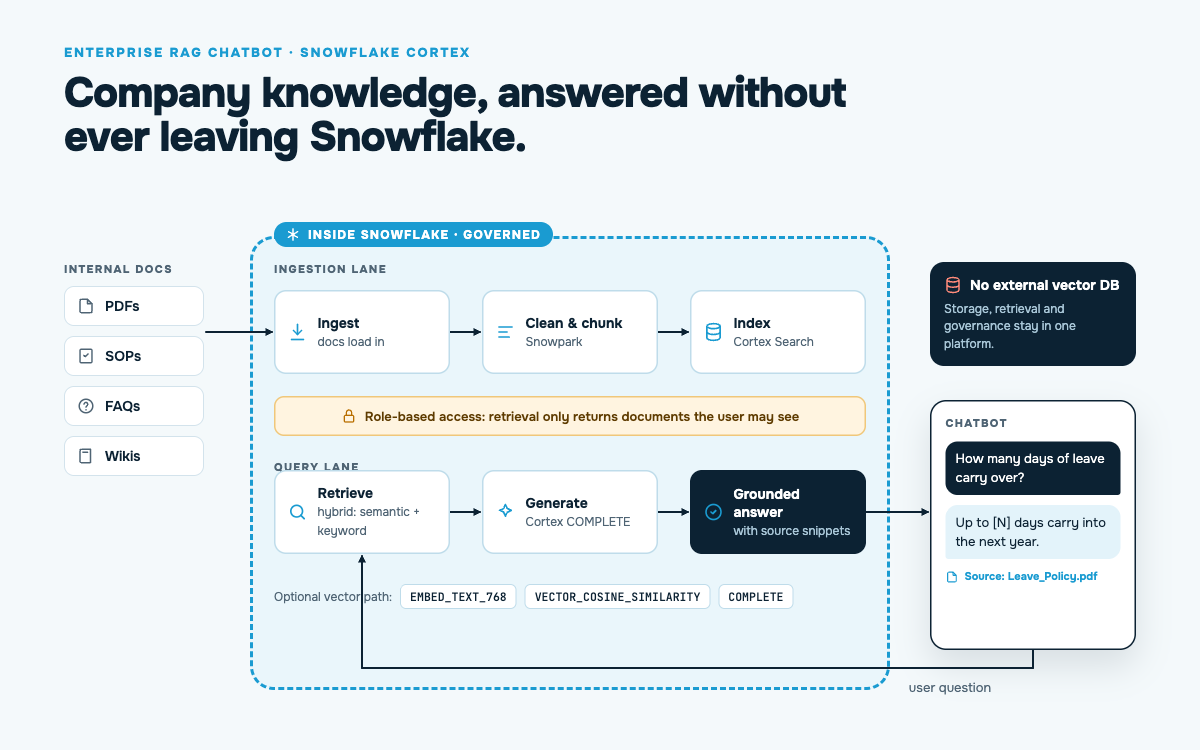
The architecture places Snowflake at the center of ingestion, retrieval, and response generation. Documents are loaded into Snowflake, cleaned, chunked, and indexed for retrieval. Cortex Search is used to find relevant content, and Cortex LLM functions are used to generate the final answer from the retrieved context. Snowflake was a strong choice because it minimizes data movement, supports native security controls, and keeps retrieval close to the source data. Cortex Search is especially useful because it provides managed hybrid retrieval, combining semantic and keyword search without needing a separate vector database.
The end-to-end workflow operates as follows: 1. Documents are ingested into Snowflake from internal sources. 2. Text is cleaned and split into manageable chunks. 3. Chunks are indexed for retrieval using Cortex Search or embeddings-based search. 4. A user asks a question in the chatbot UI. 5. The query is sent to Cortex Search to fetch the most relevant document chunks. 6. Those chunks are passed as context to a Cortex LLM function for answer generation. 7. The chatbot returns a grounded response, optionally with source snippets.
Cortex Search is used as the retrieval layer. It indexes document chunks and performs hybrid search so relevant content can be found even when the user query does not exactly match the source text. This improves recall and relevance compared to keyword-only search.
Cortex LLM functions are used to generate the final answer after retrieval. The retrieved chunks are inserted into a prompt, and the model produces a response based only on that context. This is the core RAG pattern that reduces hallucinations and keeps answers tied to company data.
If using a vector-based design, the `EMBED_TEXT_768` (or similar) embedding function can convert document chunks and user queries into vectors. These vectors can then be compared using similarity functions to retrieve the closest passages. This is useful when you want full control over the retrieval pipeline.
The `COMPLETE` function is used to produce the final natural-language answer. It takes the prompt plus retrieved context and returns a concise response. In a RAG setup, it is typically the last step after retrieval.
When embeddings are used, `VECTOR_COSINE_SIMILARITY` helps rank chunks by how close they are to the user query. This makes the retrieval step more accurate for semantic matching, especially when wording differs between the question and the source content.
Snowpark can be used to automate preprocessing, chunking, metadata enrichment, and pipeline orchestration. It is useful when document processing needs custom logic that is easier to manage in Python than pure SQL.
Snowflake roles and object-level permissions ensure retrieval respects user entitlements. This is important in enterprise RAG because the chatbot must not expose documents a user is not allowed to access.
A RAG chatbot in Snowflake is a practical way to turn internal documents into a useful AI assistant. Cortex Search handles retrieval, Cortex LLM functions handle generation, and Snowflake provides the governance and scalability needed for production use. This makes the solution both technically strong and easy to maintain.