
AutoPilot AI is an autonomous AI assistant capable of executing desktop and enterprise tasks with minimal human intervention, using vision-enabled automation to interact directly with applications.
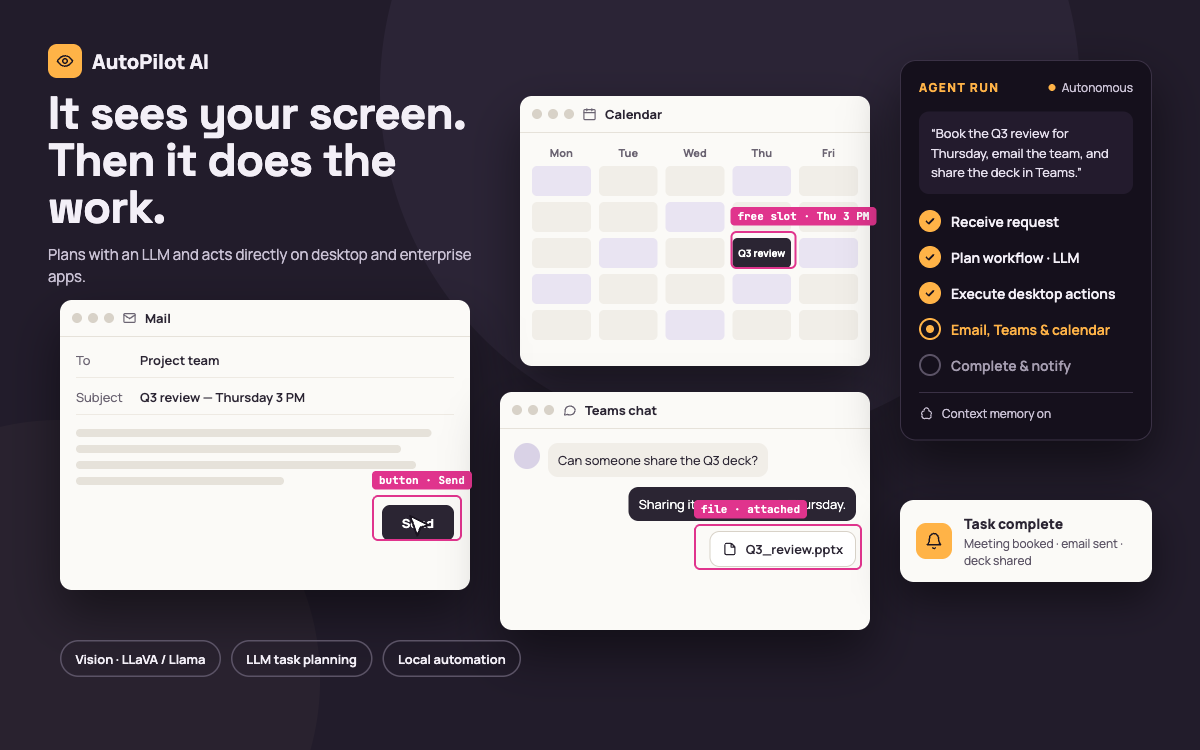
Employees spend time on repetitive digital tasks — scheduling, messaging, email handling — that require switching between multiple desktop and enterprise applications. The goal was an assistant that could plan and carry out these tasks directly, rather than just suggesting steps.
The assistant receives a user request, plans the required workflow using an LLM, and then executes it by interacting directly with desktop applications and enterprise tools such as email, Microsoft Teams, and calendars, using vision-enabled local automation to control the interface before notifying the user on completion.
AutoPilot AI extends automation beyond predefined scripts by enabling intelligent agents to reason, plan, and execute tasks directly across enterprise applications and digital environments.
AutoPilot AI demonstrates the future of enterprise automation where intelligent agents can operate autonomously while remaining aligned with business objectives and human oversight.